Data model and storage
The HMC FAIR Data Dashboard utilizes a relational database (specifically MariaDB ) to ensure the persistence of stored data. To enhance data integrity and minimize redundancy, the database has been normalized following standard conventions. The resulting structure aims to eliminate anomalies and improve overall data quality.
For a visual representation, refer to the Enhanced Entity-Relationship (EER) diagram below:
Enhanced Entity-Relationship (EER) diagram
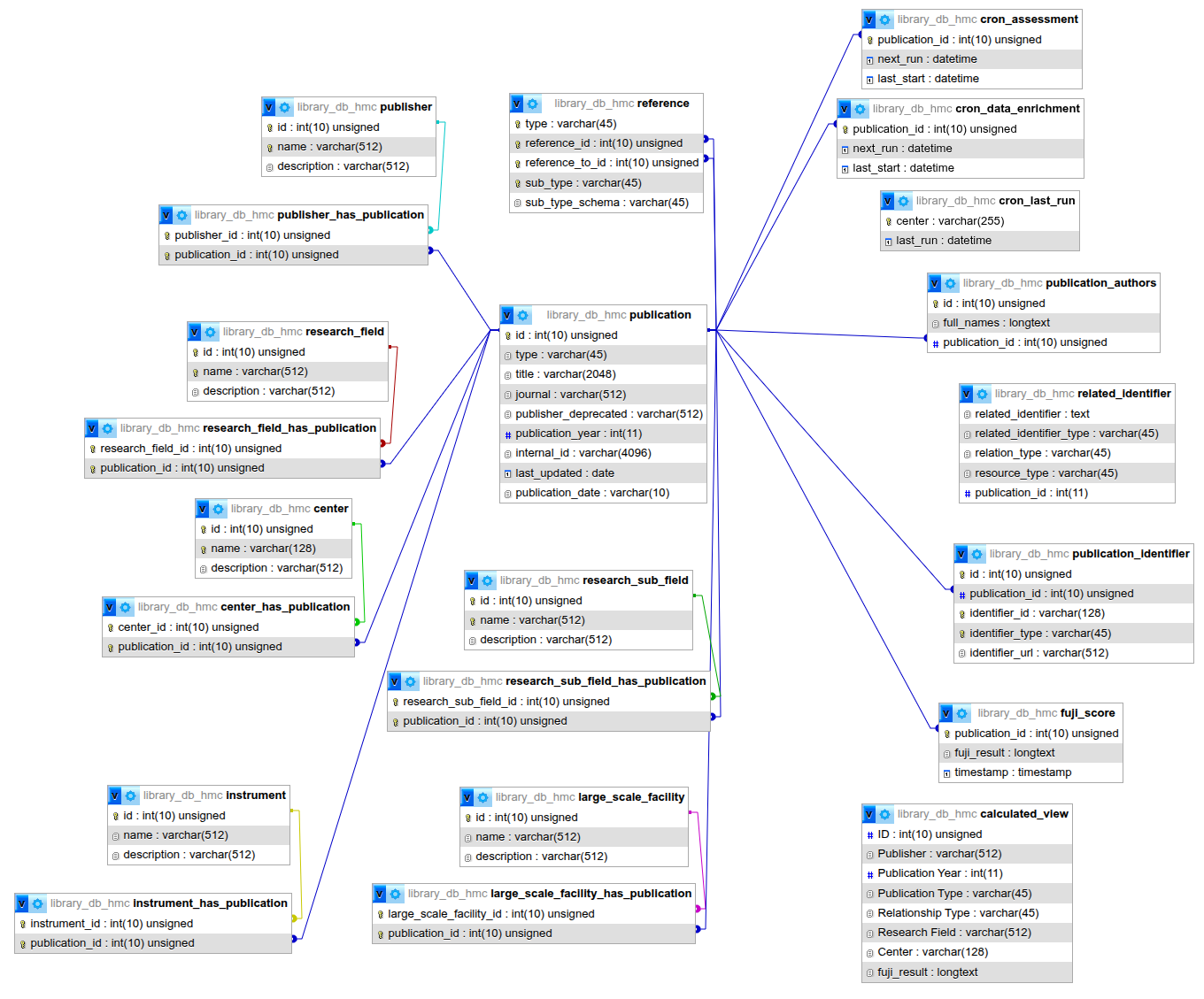
Database Schema
The database schema is accessible for utilisation in mariadb/schema.sql file.
Preparation of data for presentation in the Dashboard
In order to gain access to the data, SQL queries have been written in the utility/db.py file. Furthermore, the pymysql python driver is utilised for this purpose.
The following steps must be followed in order to access the data:
1. Connecting to the database
In order to establish a connection with the database and get a cursor, we defined the function as follows:
@contextmanager
def db_cursor():
    # Code to acquire resource, e.g.:
    connection = pymysql.connect(
        host=DB_CONTAINER_NAME_OR_ADDRESS,
        user=DB_USER,
        password=DB_PASSWORD,
        database=DB_NAME,
        cursorclass=DictCursor,
    )
    with connection:
        yield connection.cursor()
        connection.commit()
2. Defining the SQL queries
The subsequent stage of the process is to define the SQL query, for instance:
  SELECT p.publication_year as 'Publication Year',
  p.`type` as 'Publication Type', COUNT(DISTINCT p.id) as 'Total Number of Literatures'
  FROM publication AS p
  INNER JOIN center_has_publication AS pc ON p.id = pc.publication_id
  INNER JOIN center AS c ON pc.center_id = c.id
  WHERE p.`type` = 'Literature' AND p.publication_year >= 2000 AND p.publication_year <= %s
  GROUP BY p.publication_year
  ORDER BY p.publication_year
3. Executing the queries
3.1. Function to execute
The following function enables the execution of queries and the storage of the resulting data in a data frame, which can then be accessed and utilised as required via the dashboard.
def get_dataframe(query, args=None, success_message="Data Selection Successfully Done!"):
    with db_cursor() as cursor:
        cursor.execute(query, args)
        data = _format_fuji_results(cursor.fetchall())

    dataframe = pd.DataFrame(data)
    print(success_message)
    return dataframe
3.2. Executing the function
The following illustrates the calling of the function that will execute the query and return a data frame, which can be utilized across the entire dashboard.
data_count_df = get_dataframe(
SELECT_DATASET_PUBLICATION_COUNT_QUERY,
args=[MAX_YEAR],
success_message="DATASET PUBLICATION COUNT queried successfully")
The objective has been to reuse the queried data as much as possible throughout the dashboard.